
Income tax helper
Estimate your income tax under the old and new regimes, presumptive taxation (44AD, 44ADA, 44AE), advance tax, bank statement import, and an ITR-4 summary to file from.
The tax rules built in are for FY 2025-26 (AY 2026-27). When today is in a later year, a banner says so, and invoices from the later year are not counted: enter that income yourself. Treat every figure as an estimate and have your CA confirm it before filing. The helper does not file your return; see what it does not do.
#Which year the figures are for
The line under the page title says the year: FY 2025-26 · AY 2026-27. FY (financial year) is the year you earned the money, 1 April 2025 to 31 March 2026. AY (assessment year) is the year after, when you file the return for it.
If today falls in a later financial year, an amber banner at the top says These figures are for FY 2025-26, not the current FY .... It means:
- The slabs, rebate and capital-gains rates used are those of FY 2025-26. Rates for the newer year are not built in yet, so nothing is worked out with them.
- The business income filled in from your invoices counts only invoices dated in FY 2025-26. Income of the newer year must be typed in by hand.
The banner is a reminder, not an error. You can still use every tab to check FY 2025-26 before filing for it.
#The five tabs
Open Income Tax from the sidebar. The buttons at the top switch between five tabs; rest the mouse on one to see what it does. The small ? at the end of the row opens this guide at the tab you are on.
| Tab | What it does |
|---|---|
| Regime Calculator | Old and new regimes side by side, and which costs less |
| Presumptive (§44AD/ADA) | Income under sections 44AD, 44ADA and 44AE, without full books |
| Advance Tax | The instalments due, and interest for paying late |
| Bank Statement Import | Read a bank CSV and sort each transaction |
| ITR Summary | The year in one place, and the ITR-4 summary PDF |
The tabs work together: the Presumptive tab and the bank import fill the calculator, the calculator's tax drives the Advance Tax tab, and the ITR Summary uses all of them. What you type on the first three tabs is remembered in this browser, so you can close the app and come back. Figures read from your invoices, purchase bills and expenses are for the business selected in the sidebar; what you type stays the same whichever business is selected.
#Regime Calculator
Since FY 2023-24 every individual can choose between two ways of working out income tax:
| New regime (section 115BAC) | Old regime | |
|---|---|---|
| Rates | Lower slab rates, wider slabs | Higher slab rates |
| Deductions | Almost none: only the standard deduction on salary (₹75,000) and employer NPS, 80CCD(2) | 80C (PPF, LIC, ELSS...), 80D health insurance, home-loan interest, donations and the rest; standard deduction ₹50,000 |
| Zero tax up to | ₹12 lakh of income (rebate under 87A, up to ₹60,000) | ₹5 lakh (rebate up to ₹12,500) |
| How to choose it | The default; nothing to do | Business owners file Form 10-IEA before the return's due date |
In short: if you have big deductions (a home loan, full 80C, health insurance for parents), the old regime may cost less; otherwise the new one usually wins. The calculator works out both and tells you.
The left column, Your income, is what you type. The right column shows the result, live as you type: the Recommended card, then the Old Regime and New Regime cards side by side.
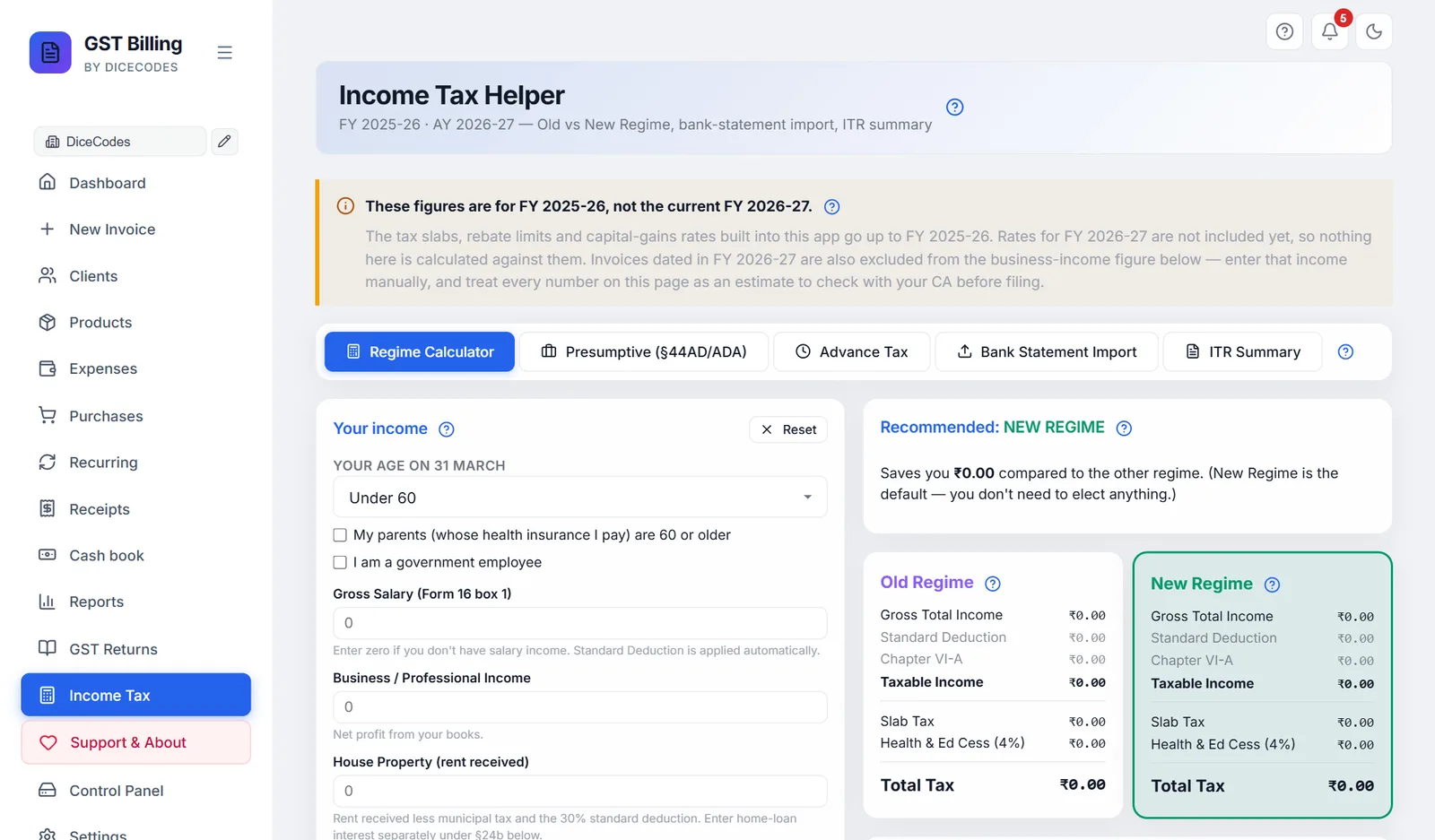
#Your income
First three questions about you. They change the old-regime slabs and some deduction limits:
| Box | What it changes |
|---|---|
| Your age on 31 March | Under 60, 60 to 79 (senior citizen) or 80 or older (super senior citizen). Old-regime tax-free limit ₹2.5 lakh, ₹3 lakh or ₹5 lakh. Also the 80D, 80DDB, 80TTA and 80TTB limits. |
| My parents (whose health insurance I pay) are 60 or older | Raises the 80D limit for their insurance from ₹25,000 to ₹50,000. |
| I am a government employee | Employer NPS, 80CCD(2), allowed up to 14% of salary instead of 10%. |
Then your income for the year, in rupees:
| Box | What to enter |
|---|---|
| Gross Salary (Form 16 box 1) | Salary before any deduction, as in box 1 of your Form 16. Zero if you have no salary. The standard deduction is applied for you. |
| Business / Professional Income | Your business profit. If it is zero, the app fills it in from this business's rupee sales, less purchases and business expenses, all without GST, for FY 2025-26 (personal drawings and asset purchases are not counted as expenses). The note under it then says Auto-filled from your invoices.... Change it if your books say otherwise, or use the Presumptive tab. |
| House Property (rent received) | Rent from a let-out property, less municipal tax and the 30% standard deduction. Home-loan interest goes in §24b below. |
| Other Sources (bank interest, dividends, etc.) | Savings and FD interest, dividends, other income. Savings interest also goes in 80TTA below to claim the deduction. |
Reset at the top of the card clears every box on this tab back to zero. (The business income fills itself in again the next time you open the screen.)
Business income stays at zero: it is filled only from invoices dated in FY 2025-26, in rupees, for the business selected in the sidebar; and only when the box is zero. Business income looks too high: purchase bills or expenses for the year are not entered in the app. Type the right figure over it.
#Capital gains (special rates)
Profit from selling shares or equity mutual funds is taxed at its own rate, not your slab rate, under both regimes:
| Box | What it is | Tax |
|---|---|---|
| STCG on listed equity (§111A) | Short-term gain: shares or equity funds held 12 months or less | 20% flat |
| LTCG on listed equity (§112A) | Long-term gain: held more than 12 months | First ₹1.25 lakh free, 12.5% on the rest |
Gains on property, gold or debt funds are not entered here; ask your CA. With capital gains you may need ITR-2 or ITR-3 instead of ITR-4; see Can you file ITR-4?
#Deductions (Old Regime only)
Each box is an amount you can subtract from income under the old regime. They do not reduce new-regime tax. Under each box is its limit (Cap) and what it covers; if you type more than the limit, only the limit is counted.
| Box | For | Limit used |
|---|---|---|
| §80C | PPF, ELSS, LIC premium, EPF, children's tuition fees, home-loan principal, NSC | ₹1,50,000 |
| §80CCD1B | Your own extra NPS contribution | ₹50,000 |
| §80D | Health insurance for self, family and parents | ₹25,000 + ₹25,000; ₹50,000 for each part that is 60 or older |
| §80TTA | Savings-account interest, under 60 | ₹10,000 (nothing if 60+) |
| §80TTB | Bank and post-office deposit interest, 60 and older | ₹50,000 (nothing if under 60) |
| §80E | Education-loan interest, for 8 years | No cap |
| §80G | Donations to approved funds and charities | No cap; enter the amount you may claim |
| §80GG | Rent you pay when you get no HRA | ₹60,000 |
| §80DDB | Treatment of specified serious illness | ₹40,000; ₹1,00,000 if 60+ |
| §80U | Your own disability | ₹1,25,000 |
| §24b | Home-loan interest on the house you live in | ₹2,00,000 |
| §80CCD(2) — employer NPS | What your employer pays into your NPS. Allowed under both regimes. | 10% of salary (14% for government employees) |
The 80G box takes the amount you are allowed to claim; the 50% or 100% rule for each charity is not applied for you.
#Recommended regime
The card at the top right says Recommended: NEW Regime (green) or OLD Regime (purple), and Saves you ₹... compared to the other regime. If both cost the same, new is recommended.
- New recommended: nothing to do. It is the default when you file.
- Old recommended: with business income, file Form 10-IEA on incometax.gov.in before the return's due date, or the new regime applies anyway. Salaried people without business income choose in the return itself.
The Advance Tax tab and the ITR Summary use the recommended regime's tax.
#Old Regime and New Regime cards
Each card works out the tax step by step. The recommended one has a coloured border.
| Line | Meaning |
|---|---|
| Gross Total Income | Salary after standard deduction, business, house property and other sources added up (capital gains are taxed separately below) |
| Standard Deduction | ₹75,000 (new) or ₹50,000 (old) off salary; only if you have salary |
| Chapter VI-A | The deductions allowed: all the boxes above for old, only 80CCD(2) for new |
| Taxable Income | Income the slabs apply to |
| Slab Tax | Tax by the slabs below |
| STCG (20%), LTCG (12.5%) | Capital-gains tax, shown only when you entered gains |
| §87A Rebate | The tax waived for smaller incomes, shown when it applies |
| Surcharge | Extra tax on income above ₹50 lakh, shown when it applies |
| Health & Ed Cess (4%) | 4% on the tax plus surcharge |
| Total Tax | What you owe for the year, before TDS and advance tax already paid |
The slabs built in, for FY 2025-26:
| New regime | Rate | Old regime (under 60) | Rate |
|---|---|---|---|
| Up to ₹4 lakh | 0% | Up to ₹2.5 lakh | 0% |
| ₹4 to 8 lakh | 5% | ₹2.5 to 5 lakh | 5% |
| ₹8 to 12 lakh | 10% | ₹5 to 10 lakh | 20% |
| ₹12 to 16 lakh | 15% | Above ₹10 lakh | 30% |
| ₹16 to 20 lakh | 20% | ||
| ₹20 to 24 lakh | 25% | ||
| Above ₹24 lakh | 30% |
For seniors the old regime's 0% band is ₹3 lakh (60 to 79) or ₹5 lakh (80+). The note under the cards, How this is computed, gives the order: slabs, then the 87A rebate, then surcharge, then cess.
A shop owner with ₹10,00,000 business income and no deductions: new regime taxable ₹10 lakh, slab tax ₹40,000, fully waived by the 87A rebate: ₹0. Old regime: slab tax ₹1,12,500 + 4% cess = ₹1,17,000. New is recommended.
#Presumptive income
"Presumptive" means the law presumes your profit is a fixed share of your turnover, so you do not keep full books of account or get them audited. You declare that share (or more) as income and file the simple ITR-4 (Sugam). Most small shops, traders and professionals use it.
Fill in the left card (Section), check the right card (Presumptive computation), then click Use ₹... as Business Income to send the figure to the Regime Calculator.
#Section: 44AD, 44ADA or 44AE
Click the button that fits your work. The boxes below change with it.
| Button | For | Income presumed | Limit |
|---|---|---|---|
| §44AD | Trading, retail, wholesale and manufacturing | 6% of turnover received digitally (UPI, NEFT, RTGS, cheque), 8% of cash turnover | ₹3 crore turnover if cash is no more than 5% of it, otherwise ₹2 crore |
| §44ADA | Professionals: CA, doctor, lawyer, architect, engineer, consultant | 50% of gross receipts | ₹75 lakh receipts if cash is no more than 5%, otherwise ₹50 lakh |
| §44AE | Transporters owning up to 10 goods vehicles | ₹1,000 per tonne per month for each heavy vehicle (over 12,000 kg); ₹7,500 per month for each other vehicle | 10 vehicles at any time in the year |
The boxes:
- 44AD: Turnover received DIGITALLY (UPI/NEFT/RTGS/cheque), Turnover received in CASH, and Actual profit (optional override).
- 44ADA: Gross receipts (digital), Gross receipts (cash), and Actual profit (optional override).
- 44AE: Heavy vehicles (> 12,000 kg): sum of vehicle-months (2 trucks for 12 months = 24), Heavy vehicle gross tonnage (avg) (13 to start), and Light vehicles: sum of vehicle-months.
Actual profit: if your real profit is higher than the presumed share, enter it, because you must declare the higher figure. You cannot declare less than the presumed share under these sections.
- Find your turnoverYour sales for the year without GST are on the ITR Summary tab (Sales excl. GST).
- Split itEnter what came by UPI, bank transfer or cheque as digital, and the rest as cash.
- Check the resultRead the Presumptive computation card and any warning.
- Send it to the calculatorClick Use ₹... as Business Income.
#Presumptive computation
The right card shows the working:
- 44AD and 44ADA: Turnover / gross receipts, Deemed income @ 6% / 8% (or @ 50%), and Declared income: the deemed income, or your actual profit if higher.
- 44AE: Heavy vehicles (₹1,000 × tonnes × months), Light vehicles (₹7,500 × months) and Declared income.
A yellow box warns when something is wrong: turnover over the limit (you then need regular books, ITR-3 and a tax audit under section 44AB), cash above 5% when that costs you the higher limit, more than 10 vehicles, or an actual profit lower than the presumed share.
Use ₹... as Business Income copies the declared income into Business / Professional Income on the Regime Calculator and opens that tab. For 44AD and 44ADA it also ticks Presumptive on the Advance Tax tab (pay everything by 15 March). The button is hidden when you are over the limit. The ITR-4 PDF uses this figure for business income.
#Why presumptive taxation?
The box at the bottom right lists what you gain, and the one catch:
- No full books of account and no tax audit (section 44AB).
- Advance tax in one go, by 15 March, instead of four instalments.
- The simple ITR-4 (Sugam) form instead of ITR-3.
- The catch (44AD): once you opt in, keep using it for 5 years. If you leave early, you cannot come back to 44AD for the next 5 years.
#Advance tax
Advance tax means paying income tax during the year, in parts, instead of all at the end. If your tax for the year, after TDS already cut, is ₹10,000 or more, you must pay it in four instalments:
| Due by | Paid in total by then |
|---|---|
| 15 June | 15% |
| 15 September | 45% |
| 15 December | 75% |
| 15 March | 100% |
If you use presumptive taxation (44AD or 44ADA), you may pay all of it by 15 March instead. Paying late or short costs interest of 1% a month under sections 234B and 234C. You pay advance tax on incometax.gov.in with challan 280 (e-Pay Tax).
The tab uses the Total Tax of the recommended regime from the Regime Calculator, so fill that in first.
#Advance Tax Schedule
The top card. It says Based on your recommended NEW Regime total tax of ₹....
| Item | What it does |
|---|---|
| Presumptive (pay 100% by 15 March) | Tick it if you use 44AD or 44ADA: the schedule becomes one instalment on 15 March. |
| TDS already deducted | Tax already cut from your salary, interest, rent or contract payments. Find it in Form 26AS or the AIS on incometax.gov.in. |
| Total tax liability, Less: TDS credit, Net advance-tax liability | The tax, the TDS, and what is left to pay as advance tax. |
If what is left is under ₹10,000, a green note says no advance tax required and nothing else shows. Otherwise the instalment table appears:
| Column | Meaning |
|---|---|
| Installment, Due Date | #1 to #4 and their dates |
| % cumulative | How much of the year's tax should be paid in total by then |
| This installment | The amount for that date alone |
| Paid by due date | The payments you entered, dated on or before it |
| Shortfall | What is still missing by that date: red if any, green if none |
The total tax is zero or wrong: fill in the Regime Calculator first; this tab follows it. A shortfall after you paid: enter the payment, with its real date, under Payments made.
#Payments made
Record each advance-tax payment you have made, so the schedule and the interest are right.
- Add a lineClick + Add payment. A line appears with today's date.
- DateChange it to the date on your challan.
- AmountType what you paid.
- RemoveThe × at the end of a line removes it.
"No advance-tax payments recorded yet." shows until you add one. The payments are remembered in this browser.
#Interest under §234B / §234C
What paying late or short costs, worked out from the schedule and your payments:
- §234C — installment shortfall: 1% a month on what was short at each date, for 3 months (1 month for the March instalment). The June and September instalments are forgiven if you paid at least 12% and 36% by then.
- §234B — post year-end delay (1% per month): if by 31 March you had paid less than 90% of the tax, 1% a month on what is unpaid, from 1 April until today.
- Total interest: the two added up.
Shortfalls are rounded down to the nearest ₹100 first, as the rules say. The interest is an estimate; the department's figure on filing is final.
#Bank statement import
Turn a year of bank transactions into the figures the calculator needs: interest, rent received, 80C and 80D payments, business receipts.
- Download a CSVFrom net-banking or your bank's app, save the statement for the year as CSV. Excel files must be saved as CSV first; PDFs are not accepted.
- Drop it inDrag the file onto the box Drop a bank-statement CSV here or click to select, or click it and choose the file. SBI, HDFC, ICICI, Axis, Kotak, PNB and Yes Bank formats are recognised, and most others with Date, Narration, Debit, Credit and Balance columns work too. It is read on your computer; nothing is uploaded.
- Check the categoriesEach transaction is sorted by its description. Change any that are wrong. Mark your sales receipts as Business receipts yourself.
- Push to the calculatorClick Push to Calculator.
The imported statement is not kept after you leave the screen.
"No transactions found" or "Could not parse this CSV": the file is not the bank's plain CSV, or it is an Excel file renamed to .csv. See A CSV import did not work.
#How to get the CSV
Shown under the drop box until you import a file:
- Net-banking: Accounts, Statements, download as CSV (or as Excel, then open it in Excel and save as CSV).
- Mobile app: Account statement, Share, Export CSV.
- Choose the dates of the financial year, 1 April 2025 to 31 March 2026.
- The file is read in your browser; nothing is sent to a server.
Import one account at a time. For two accounts, import the first, push it, then import the second and push it.
#Reviewing the transactions
After the import the card is titled with the bank and the count, such as HDFC — 412 transactions. Below it, a strip of coloured totals per category, then a table with Date, Description, Debit (red), Credit (green) and Category.
The app guesses each category from the words in the description; change any by picking from the Category box on its row. The totals follow.
| Category | Guessed from words like | On push |
|---|---|---|
| Salary income | salary, payroll | Not pushed (enter salary from Form 16) |
| Business receipts | Never guessed: set it on your sales receipts | Added to Business / Professional Income |
| Business expense | office rent, rent paid, EMI, home loan, electricity, broadband, telephone, AWS, Adobe | Not pushed |
| Interest earned | int, interest, SB int | Added to Other Sources, and to 80TTA (up to ₹10,000) |
| Rent received | rent, rental | 70% added to House Property (the 30% deduction taken off) |
| Investment / MF / PPF | SIP, mutual fund, ELSS, PPF, NPS | Not pushed; put 80C items in 80C yourself |
| 80C claim | LIC, life insurance | Added to 80C |
| 80D claim | health insurance, mediclaim | Added to 80D |
| GST paid | GST, CGST, SGST, IGST | Not pushed |
| Transfer / unclassified | IMPS, NEFT, RTGS, UPI, and anything not matched | Not pushed |
| Personal spending | Amazon, Flipkart, Swiggy, Zomato, ATM, cash withdrawal | Not pushed |
Push to Calculator adds these to what is already in the calculator and opens it. Each statement can be pushed once; pushing again says it is already in the calculator. Import it again to push a fresh copy. Clear throws the imported statement away.
Most rows are Transfer / unclassified: UPI and NEFT payments carry little description; set the business ones to Business receipts by hand. Figures doubled in the calculator: the same statement was imported and pushed twice; Reset the calculator and push once.
#ITR Summary and the ITR-4 PDF
The whole year in one place, for the business selected in the sidebar. Four cards at the top, for FY 2025-26, all without GST:
| Card | From |
|---|---|
| Sales excl. GST (FY 2025-26) | Your rupee invoices, less credit notes; estimates, challans and cancelled invoices left out. TCS is taken out too. |
| Trading Purchases | Your purchase bills, taxable value |
| Business Expenses | Your expenses without GST, except Personal / Drawings and Asset Purchase |
| Net Business Income | Sales less purchases less expenses (never below zero) |
#Income breakdown
Sales, less trading purchases and business expenses, gives = Net business income. Then what you typed in the calculator: + Salary declared, + Rent received, + Other sources and + Capital gains (STCG + LTCG). These last four are greyed when empty.
If you entered expenses under Asset Purchase (a computer, a machine, furniture), a note says they are not deducted here: an asset is written off over the years as depreciation (section 32). Ask your CA for the depreciation figure and enter it as a business expense.
The net business income here is from your books. It is not copied into the calculator by itself; the calculator has its own Business / Professional Income box.
#Tax snapshot
Recommended regime, Tax under NEW Regime (or OLD), Tax under other regime and You save vs other regime, all from the Regime Calculator.
Below, a grey box. If your sales are under ₹2 crore and your business type is not professional, it says You may qualify for Section 44AD presumptive taxation; see the Presumptive tab. It also gives the due dates: 31 July 2026 for the return when no audit is needed, 31 October 2026 with a tax audit, and the advance-tax dates.
#ITR-4 (Sugam) Filing Summary PDF
Download ITR-4 Summary makes a PDF with each ITR-4 field worked out, in the order of the form, to copy into incometax.gov.in or hand to your CA:
- Assessee: business name, GSTIN and PAN from Settings.
- Part A — General: PAN (or "Fill from your profile"), filing status, Aadhaar reminder.
- Nature of Business: the presumptive section and turnover, when you filled the Presumptive tab.
- B — Income: salary less standard deduction, house property, business (the presumptive income if you filled that tab, otherwise the calculator's figure), other sources, gross total income.
- C — Deductions: each Chapter VI-A deduction under the old regime, or 80CCD(2) under the new.
- D — Tax Computation: taxable income, slab tax, rebate, surcharge, cess, total tax.
- E — Advance Tax: each instalment and what you paid, when advance tax applies.
The PDF uses the recommended regime, and your PDF accent colour from Print Settings when custom colours are on. It is saved to your Downloads folder as ITR-4-Summary-YourBusiness-2026-27.pdf.
ITR-4 is for resident individuals, HUFs and firms (not LLPs) with total income up to ₹50 lakh, using presumptive taxation. With most capital gains (anything beyond long-term gains on listed shares of up to ₹1.25 lakh), income above ₹50 lakh, or regular books instead of presumptive income, you need ITR-2, ITR-3 or another form: use the PDF as a worksheet for your CA. Check every figure against Form 26AS and AIS before filing.
"Could not generate PDF": press Ctrl + F5 and try again. The PAN line is empty: add your PAN to the business in Settings. Business income in the PDF differs from the tax: the PDF takes the Presumptive tab's figure when that tab has one, while the tax comes from the calculator; click Use ₹... as Business Income on the Presumptive tab so both match.
#Not included yet
The last card lists what the helper does not do, so you know what to get elsewhere: reading Form 16, a capital-gains module with broker imports, a house-property module for several properties, ITR-1, ITR-2 and ITR-3, the ITR JSON file the portal uploads, and Form 26AS reconciliation. File the return itself on incometax.gov.in or through your CA.